The register stays the record
Your reports sit alongside the City of London’s Veteran Tree Register. They never overwrite it.
 Epping Forest Finds
The Ledger
The map is only as good as the data behind it, and people walking the forest can see things the data can’t. Confirm what’s right, flag what’s wrong and add what’s missing. Here’s what happens to your reports.
Your reports sit alongside the City of London’s Veteran Tree Register. They never overwrite it.
When two or more different people agree a tree is wrong, it shows a “Questioned by the community” note. It stays on the map.
Changes to pubs, cafés and shops are always checked by a person before anything is touched.
We collect what people find and pass it on to the City of London so the register can be corrected at source. The current findings are public in the discrepancy report. You earn points as you go, and no account is needed.
Open any tree in the app and use Help check this tree. Standing next to it, you can say:
Your own report shows straight away, and the map highlights everything you’ve marked. Other people see the result after the next hourly update, so it can take an hour or two.
Found a tagged tree that isn’t on the map? On the Community screen, choose Add a missing tree. You’ll need two things.
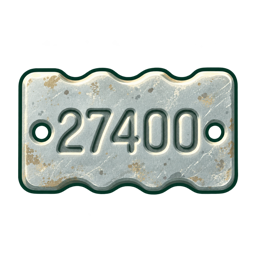
Printed on the tag. This is what identifies the tree, so we can tell when two people have found the same one.
Your position becomes the tree’s position, so you need a good GPS fix: accurate to 30 metres or better. The form shows the accuracy and won’t submit until it’s good enough.
If the tag is already on the map, we’ll point you to that tree instead. A new tree is shown to everyone once a second person has found it too.
Pubs, cafés, shops and other places have a Help check this place card at the bottom of their screen. You can confirm a place is still right, or say it has closed, moved, changed name, has wrong details or is the wrong type of place.
Reports about places are never applied automatically. Each change becomes a report that a person reviews, and further reports about the same place are added to it.
Points build up through four ranks. Confirming a place is still right earns nothing, it just hides that place’s check. Your score and a log of everything you’ve reported are on the Community screen. Scores are private for now.

You don’t need an account. Your reports are tied to a random identifier stored on your device, which you can clear at any time by clearing the site’s data. Your location is used to check you’re close to what you’re reporting. See the privacy and terms page for the full details.
Open any tree or place in the app and tap “Help check”. Spotted a problem with the app itself? Use Send feedback on the Community screen.